To get a useful contract review from ChatGPT, Claude or Gemini without exposing the parties, replace everything that identifies them with placeholders such as Company_1 and Person_1, tell the AI which role each placeholder plays, and ask specific questions. The AI reviews the terms, not the names. Then you put the names back into its answer and check it against the original contract.

What in a contract identifies the parties
The names on the first page are the obvious part. A contract repeats the parties' details in many other places:
- The parties clause: full legal names of companies and people, trading names, addresses of registered offices.
- Company registration numbers, VAT or tax numbers, and passport or ID numbers of individuals.
- Signature blocks: names and job titles of signatories, witnesses and their addresses.
- Notices clause: who receives notices, at which address, email and phone number.
- Payment terms: bank name, account number, IBAN.
- The subject of the deal: the address of a property, a vehicle's registration, a named employee or key person.
- Schedules and annexes: lists of staff, customers, premises or equipment with serial numbers.
- Headers, footers and file names, such as "Northwind_Lopez_SPA_v3.docx".
Each of these points to a real party. The schedules are the part people most often forget, because they sit at the end and look like boilerplate. Our list of what to remove before a document goes to AI covers the less obvious details too, such as a job title combined with a small town.
What is confidential but not personal data
A contract holds a second kind of secret: the deal itself. The price, the discount, the payment schedule, the cap on liability, an unusual exclusivity clause, the date a product launches. None of this names a person, so a tool that looks for personal data will leave it in place.
Usually that is what you want. The AI cannot judge a liability cap it cannot see. But if the figures or a particular clause are the confidential part, you have to deal with them yourself:
- Replace the figure with a label and keep the proportion if it matters: "Price: AMOUNT_1. The cap is 1.5 times AMOUNT_1."
- Describe a sensitive clause in general terms instead of pasting it: "a non-compete covering the EU for three years".
- Leave out the parts the question does not need. A review of the termination clause does not need the pricing schedule.
Some risk remains. A rare deal structure or a well-known product can identify the parties even with every name replaced. If the deal itself is the secret, check your firm's policy and your duties to the client before using a general-purpose AI tool at all. For lawyers, the article on client confidentiality and AI tools covers what ABA Formal Opinion 512 says about this.
Make a safe copy of the contract
By hand, this is find-and-replace with discipline. Make a list of every party, signatory, address and number, give each one a label, and replace every occurrence, including the schedules. Use the same label everywhere: if Northwind Ltd is Company_1 on page 1, it must be Company_1 in the signature block and in Schedule 2. A contract and its amendment should share the same labels too, or the AI cannot compare them.
With ClientSafe the steps are:
- Create a case for the matter and add the contract, its schedules and any amendments as separate files. ClientSafe reads PDF, including scanned PDFs, and DOCX.
- Review what it found: names, companies, addresses, phone numbers, email addresses, account and ID numbers. Untick matches that are not personal data, and mark anything it missed, such as a registration number in an unusual format.
- Copy the safe copy, or save it as a Markdown file.
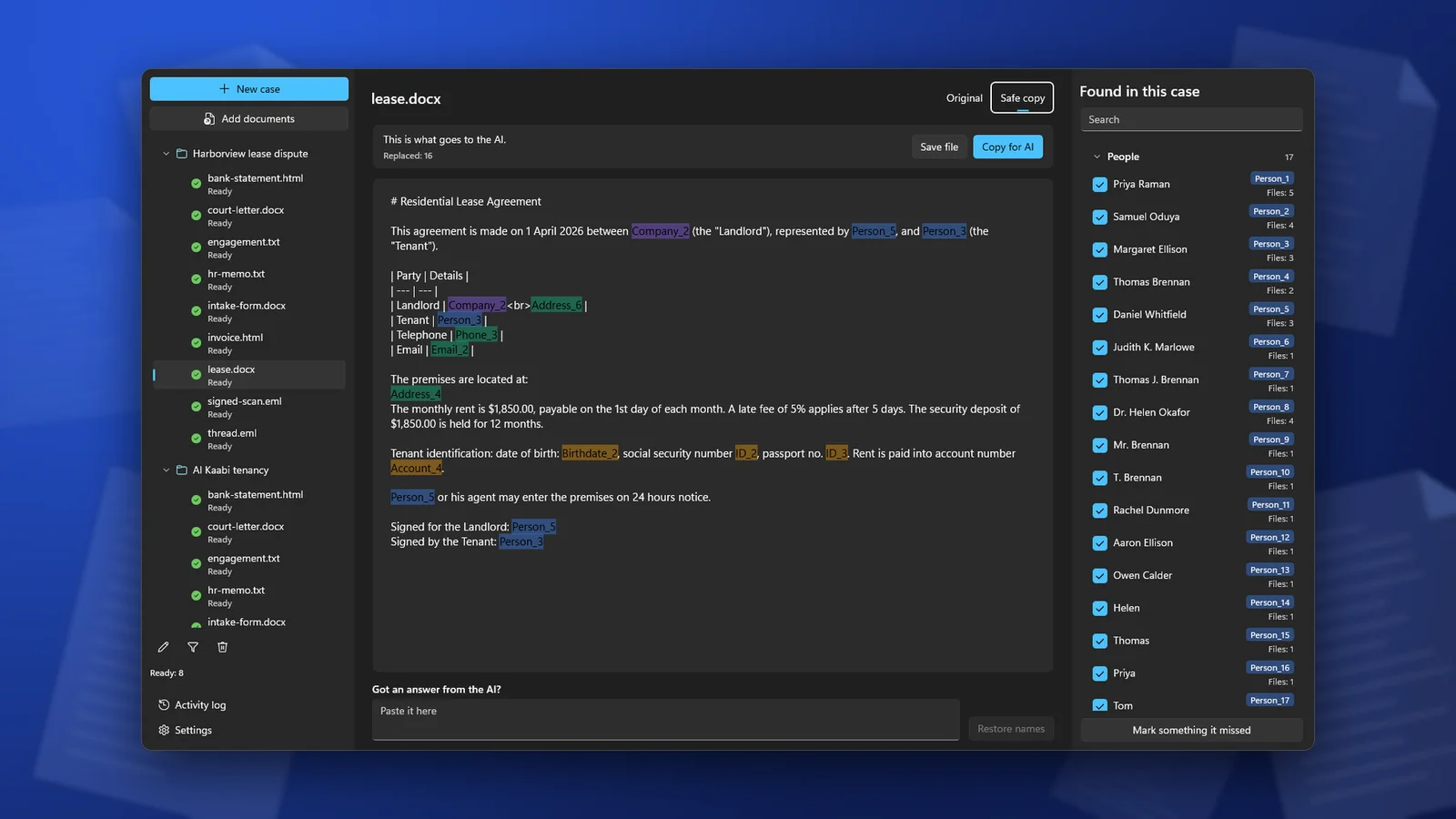
Within one case, the same party gets the same placeholder in every file, so the AI can compare the contract with its amendment. See working with a whole case.
Five prompts that work on placeholders
Start every prompt with the roles, because placeholders carry no meaning on their own. Whether Company_1 is the buyer or the seller changes the whole review. Say whose side you are on and which law the contract chooses, then ask one question at a time.
1. Risk review
This is a supply agreement governed by the law of England and Wales.
Company_1 is the supplier, Company_2 is the customer. We act for Company_2.
Names like Company_1 are placeholders: keep them exactly as written.
List the ten clauses that create the most risk for Company_2.
For each: quote the clause number and the exact wording,
explain the risk in two sentences, and suggest a fairer alternative.
2. Clause comparison
Below are two versions of the limitation of liability clause:
version A from our template and version B from Company_1's draft.
Compare them line by line. What does version B add, remove or change,
and who does each change favour? Quote the words you are comparing.
3. Plain-language summary
Person_1 is the tenant and Company_1 is the landlord.
Summarize this lease for Person_1 in plain English, under 300 words:
what they pay and when, what they must do, what the landlord must do,
how either side can end the lease, and what happens if rent is late.
Give the clause number for every point.
4. Missing clauses checklist
This is a services agreement between Company_1 (provider)
and Company_2 (client). Check it against a standard checklist for
this type of contract. List clauses that are missing or unusually thin,
such as data protection, confidentiality, IP ownership, termination,
force majeure, dispute resolution. Say which clause you checked for each.
5. Questions for the redline
We act for Company_2. Company_1 sent this draft.
Write the questions we should ask Company_1 before we sign:
ambiguous terms, obligations without a deadline, undefined terms,
and clauses that contradict each other. Group them by clause.
The clause numbers and exact quotes let you check the answer against the contract in minutes instead of rereading the whole document.
What AI contract review gets wrong
A language model is good at reading a long text and spotting what is unusual, vague or one-sided. It is weak at the parts that need verified legal knowledge:
- Jurisdiction. Whether a non-compete, a penalty clause or an exclusion of liability is enforceable depends on the country, and in the US on the state. The AI often answers in general terms, or as if the contract were under a law it was not written for. Name the governing law in the prompt and still treat any statement about enforceability as a question for a lawyer in that jurisdiction.
- Invented text. The AI may quote a clause that is not in the contract, or attribute wording to the wrong clause. This is why the prompts above ask for clause numbers and exact quotes: check each one against the original.
- Invented law. Case names, statutes and citations from a general-purpose chatbot can be fabricated. In Mata v. Avianca, a federal court in New York imposed a $5,000 penalty in June 2023 on two lawyers and their firm whose court filing cited cases that ChatGPT had made up. In June 2025, the High Court of England and Wales said in Ayinde v London Borough of Haringey that freely available generative AI tools "are not capable of conducting reliable legal research". Verify every authority in a primary source.
- Missing context. The AI does not know the negotiation history, the market practice in your sector or what the client actually cares about. A clause it flags as risky may be a concession you asked for.
Use the review as a first pass and a list of questions. It does not replace legal advice, and a contract that matters should be signed off by a qualified lawyer.
Put the names back and check the answer
An answer full of Company_1 and Person_1 is hard to forward to a colleague. Paste it into ClientSafe in the same case and the real names come back; by hand, reverse your list of replacements. Our guide to restoring real names covers the variants a model writes, such as "Company 1" without the underscore.
Then check the restored answer against the original contract: every clause number, every quote, every figure. The restored text contains client data again, so keep it with the matter's files.
Frequently asked questions
Is a review of a safe copy as good as a review of the original?
For the terms themselves, usually yes: a termination clause reads the same whether the party is Northwind Ltd or Company_1. Where the identity matters, such as a public body, a consumer or a party in a regulated sector, say so in the prompt without the name.
Can I upload the PDF instead of pasting text?
You can upload the safe copy saved as a file. Uploading the original PDF sends everything in it, including the parties' details.
Which AI tool is best for contract review?
ChatGPT, Claude and Gemini can all handle the prompts above. What matters more is the account you use and its data settings, and that you check the answer against the contract.
ClientSafe replaces the names, companies, addresses and account and ID numbers in a contract with placeholders on your PC, keeps them the same across the contract, its schedules and amendments, and puts the real names back into the AI's review. Detection is not perfect, so review the list before you copy.