To anonymize a PDF, you have to remove personal data from the visible text, from the hidden text layer of scanned pages, from comments and their author names, from form fields, and from the document properties. Drawing black boxes over names does none of that. If the PDF is going to another party, use a real redaction tool. If you only want to ask an AI about the content, do not send the PDF: send a safe copy of its text.
Where personal data lives in a PDF
Adobe's list of data types in a PDF that may need removing runs to fourteen entries. For client files, these are the ones that usually hold names:
| Place | What it can hold |
|---|---|
| Visible text | Names, addresses, account and ID numbers on the page. |
| Text layer of a scan | The same names again, as invisible text placed under the page image by OCR. |
| Comments and markups | The reviewer's notes, and the author name on every comment, often a colleague's full name or login. |
| Form fields | Values typed into a fillable form: name, date of birth, tax number. |
| Document properties and metadata | Title, author, subject, keywords, and the software that made the file. The author is often whoever created the original file. |
| File attachments | Whole other files embedded in the PDF, such as a spreadsheet or an email. |
| Bookmarks | Navigation titles such as "Lopez medical report". |
| Hidden layers and hidden text | Content switched off, covered by other objects, or printed in the background colour. |
| Earlier versions | Data from previous saves that can remain in the file after edits. |
The file name is outside the PDF but goes wherever the file goes. "Lopez_divorce_draft.pdf" needs renaming too.
Why a black box is not redaction
A rectangle drawn over a name sits on top of the text. The text is still in the file: select it, copy it, paste it somewhere else, and it appears. This is how a court filing by Paul Manafort's lawyers exposed the "redacted" passages in January 2019, and how parts of some Epstein files released by the US Justice Department in December 2025 were recovered by copying and pasting, according to The New York Times.
Real redaction deletes the text and puts the box where it was. Black highlighting in Word, a shape in a PDF editor and a dark annotation only cover the text. For documents you want an AI to read, bars have a second cost: the AI can no longer tell one person from another. Placeholders work better than black bars for that.
Scanned PDFs: the picture and the text under it
A scan is a picture of a page. Many scanners and PDF tools then run text recognition (OCR) and place an invisible text layer under the picture, so you can search and copy. That gives a scanned PDF two copies of every name: the pixels you see and the text you do not.
Covering a name in the picture leaves it in the text layer, and deleting the text layer leaves it in the picture. Redaction on a scan has to remove both. In the other direction, a scan without a text layer cannot be searched, so a search for the client's name finds nothing and proves nothing. See personal data in scans and screenshots for a quick test of which kind of page you have.
Removing it in Adobe Acrobat Pro
Redaction and sanitizing are Acrobat Pro features. The steps below are from Adobe's help pages for the current desktop app, as of October 2026.
Redact visible text and images. Following Adobe's steps:
- Select All tools, then Redact a PDF.
- In the left pane, select Redact text and images, and drag over each name or number. To redact a whole image, double-click it.
- Select Apply. In the dialog, turn on the toggle to sanitize and remove hidden information, then select Continue.
- Save the result under a new name.
For names that repeat across many pages, search and redact marks every match at once. Check the results before you apply them: a search finds "Lopez" but not "Ms. L." or a misspelling.
Remove hidden information. In the same Redact a PDF pane, Sanitize document gives two choices. Remove all strips metadata, comments, attachments, hidden layers and the rest in one step. Selectively remove lists what it found in the file, so you can tick only the items to remove. Adobe notes that redaction removes only visible text and graphics; hidden data has to be sanitized separately, which is why the toggle in step 3 matters.
Comment author names. If the comments must stay and only the names must go, Acrobat lets you change the author name. On Windows, select Menu, then Preferences, then Commenting, and clear Always use Log-in Name for Author name. Then right-click a comment, select Properties, and on the General tab replace the name in the Author field. This changes the author line only. Names written inside the comment text need editing too.
To see what is in the document properties before and after, select Menu, then Document properties (File on a Mac). The Description tab shows the author and title. Additional Metadata, then Advanced, shows the embedded XMP metadata, which can hold more.
Without Acrobat Pro
If you have the source document, such as the Word file the PDF was made from, the free LibreOffice suite can produce a redacted PDF. Open the document, choose Tools, then Redact, draw rectangles over what must go, and use Redacted Export (Black). LibreOffice's help says the covered content is removed and replaced with a block of pixels, so it cannot be copied back. Auto-Redact marks words and patterns, such as email addresses, across the whole document.
Making the PDF again from a cleaned source is often simpler than cleaning the PDF. Remove the comments and replace the names in Word, check the file properties there, then save a new PDF. The new file still gets properties of its own, so check them before sending.
Free online PDF redactors exist too. Uploading a client file to one is its own decision; see local vs online redaction tools.
When the redacted PDF goes to a court or the other side, the court's own rules decide what must be removed. In US federal courts, for example, Rule 5.2 of the Federal Rules of Civil Procedure allows only the last four digits of a social security or financial account number, the year of birth and a minor's initials. If you are unsure what applies, ask the lawyer responsible for the filing.
When the reader is an AI, send text, not the PDF
Everything above assumes the PDF itself will travel. If what you want is an AI's help with the content, such as a summary, a timeline or a list of obligations, the AI needs the words, not the file.
Pasted text carries only the characters you pasted. A new .txt or .md file is a new document: it has none of the PDF's author fields, comments, attachments, bookmarks or layers. What remains to clean is the text itself, and that is the same job as for a Word file: replace every name and number with a consistent placeholder. Our guide to anonymizing a Word document covers the manual method.
When you copy text out of a PDF, scanned pages come along only if they have a text layer, and the recognized text can contain misreadings. If the reviewers' comments matter to your question, copy them separately and replace the names in them too.
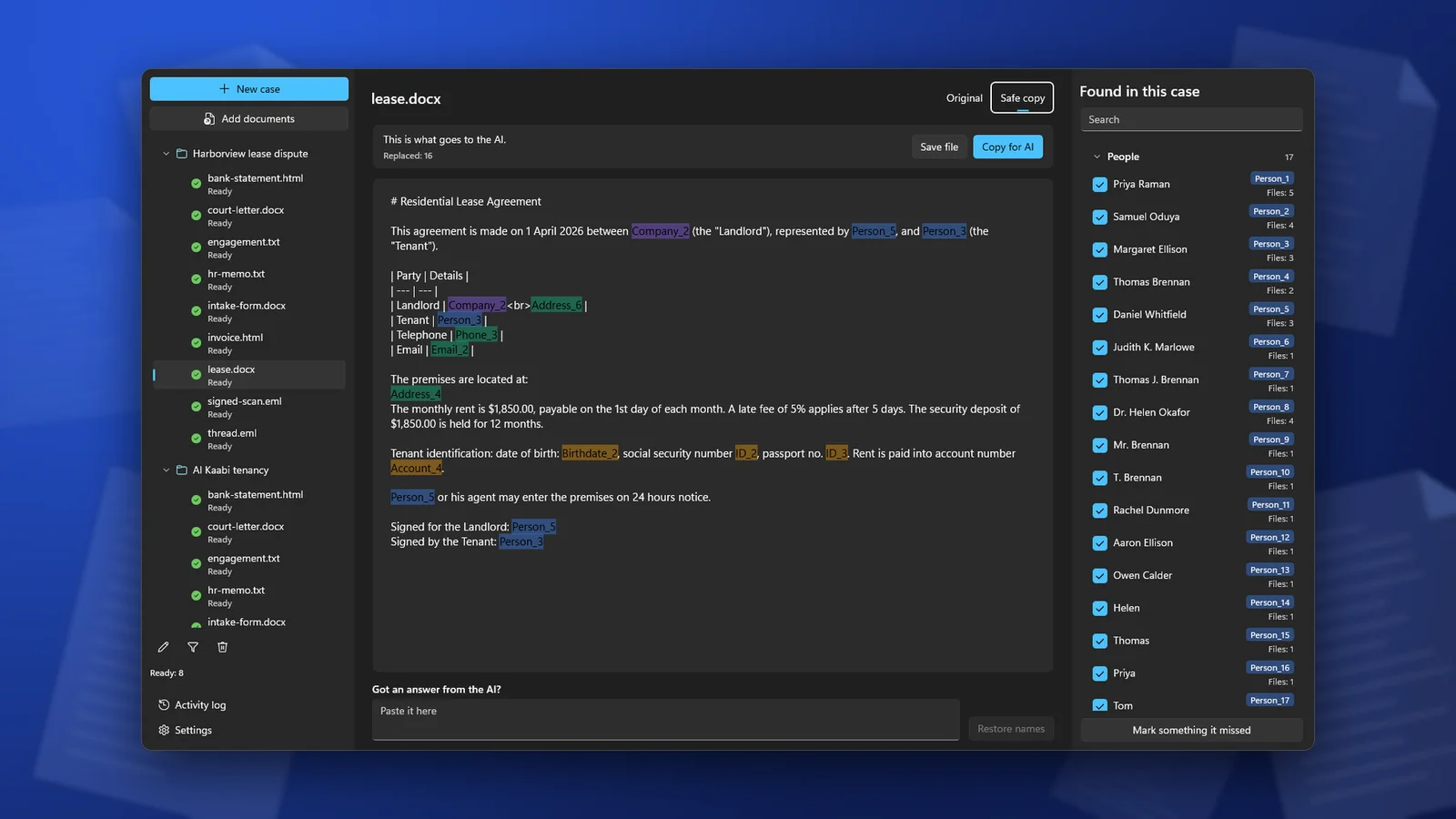
ClientSafe does this on your PC. Add the PDF to a case, and it reads the text, including scanned pages. Text found inside images is replaced as well; the images themselves are left out of the safe copy. You review what it found, untick what is not personal data, mark what it missed, and then copy the safe copy or save it as a Markdown file. The original PDF is not changed. ClientSafe is not a redaction tool for PDFs you send to a court or another party; for those, use the methods above.
Check before the file leaves
- Select all the text on every page, copy it, and paste it into a plain text editor. Search the result for the client's name.
- Open the comments panel. It should be empty, or show no real names.
- Open Document properties and read the author, title and subject.
- Look at the bookmarks and attachments panels.
- Read the file name.
Frequently asked questions
Does saving the PDF again remove the comments and metadata?
No. Saving keeps them. They have to be removed, for example with Sanitize document in Acrobat Pro, or the PDF has to be made again from a cleaned source.
How do I remove personal information from a scanned PDF?
Remove it from both the image and the text layer. A redaction tool that handles scans does both. If you only need the content for AI, take the text out of the scan, replace the names in it, and leave the scan behind.
Is renaming the comment author enough to anonymize comments?
Only if the comment text contains no names. Reviewers often write "check with Maria" or "Lopez disputes this". Read the comments, or delete them if you do not need them.
ClientSafe reads PDFs, including scanned ones, replaces names, addresses and numbers with placeholders on your PC, and gives you the safe copy to paste into an AI chat or save as a Markdown file. Detection is not perfect, so review the list before you copy.