If you want to use AI on documents with personal data, a pseudonymization tool has to get four things right. Your file is processed somewhere you are comfortable with. Each person gets the same placeholder in every document. The key that reverses the swap is stored safely. And you can check and correct what the tool found. The rest of this checklist tells you whether a tool fits your documents, your team and your budget.

What the tool has to do
Under the GDPR, pseudonymisation means processing personal data so that it can no longer be linked to a person without additional information, and that information is kept separately and protected (Article 4(5)). Pseudonymized data is still personal data. What that means for AI chatbots is covered in GDPR and pseudonymized data in AI.
For AI work, the job looks like this. Names, addresses and numbers become placeholders such as Person_1. The AI works on the placeholders. On your side, a key turns them back into names in the answer. If you never need the names back, you may need anonymization or redaction instead: see which of the three you need.
Where your data goes
- Where the processing happens. Either on your computer, or on the vendor's servers after you upload the file. In the second case the original, with every name in it, reaches a third party before it is protected. Our comparison of local and online tools lists the questions to ask an online vendor and a simple test for a desktop app: switch off the network and try it.
- What happens to the data afterwards. For a cloud service: how long files and results are kept, in which region, and who the sub-processors are. For a desktop app: what it writes to your disk and how you delete it.
- Logs. A record of when documents were processed is useful when a client or your data protection officer asks. Check that the log itself does not contain the personal data.
Whether you can get the names back
- Consistency. The same person should get the same placeholder in every paragraph and in every document of one matter. Otherwise the AI cannot tell that the tenant in the lease and the sender of the email are one person. Ask how the tool handles variants such as "Maria Lopez", "Ms Lopez" and "M. Lopez".
- Reversibility. Some tools replace data one way only. Others keep a table that links placeholders to real names, or encrypt the values with a key that can decrypt them later.
- Where the key is kept. The table or key is the "additional information" the GDPR definition talks about. Ask where it is stored, whether it is encrypted, who can open it and when it is deleted. If anyone who has the safe copy can also read the key, the pseudonymization protects little.
Whether it fits your documents
- Types of data found. Names, companies, addresses, phone numbers, email addresses, account and ID numbers, dates of birth. If you work across borders, check national ID and tax numbers for the countries you deal with. Job titles, nicknames and rare details are hard for any detector, so you will mark some of them by hand.
- A review step. Detection is never complete. Even the documentation of Presidio, a widely used open-source detector, says there is no guarantee it will find all sensitive information. You need to see every match, untick the false ones and add what was missed before anything leaves.
- File formats. PDF, Word, Excel, emails. Scanned PDFs and photos of documents need text recognition. Some tools accept plain text only, which means you convert every file yourself.
- Languages. Detection depends on the language. Test with real documents in each language you work in.
Who it is built for and what it costs
- Developers or office users. A library or API needs someone to install it, write code around it and keep it running. A desktop app only needs to be installed. They are built for different people, and neither is better in general.
- Pricing model. Pay per volume (per gigabyte or per hundred characters), a subscription per user, a one-time purchase, or free open source plus your staff's time. Work out the yearly cost at the volume you actually expect.
Four kinds of tools
The examples below are the ones we could check against vendor documentation. Features and prices are as of October 2026.
Open-source developer libraries
Presidio is an MIT-licensed framework for finding and de-identifying personal data. It started at Microsoft and is now a community-run project under the Data Privacy Stack organization. Its anonymizer can replace, redact, mask, hash or encrypt each item it finds, and encrypted values can be decrypted with the same key. A separate module finds and redacts text in images using OCR.
It is free, runs on your own machines and can be customized for almost any pipeline. It is a toolkit rather than an application: installation means Python packages, a language model download and code you write yourself. Review screens, case handling and file conversion are yours to build.
Cloud data-protection services
Google Cloud Sensitive Data Protection finds sensitive data with a long list of built-in detectors and can replace it with tokens. Deterministic and format-preserving encryption give the same token for the same value, and the data can be re-identified with the key. Google recommends wrapping that key with Cloud Key Management Service. The service can also redact images by covering findings with opaque boxes. It is priced per gigabyte.
Amazon Comprehend detects personal data in English or Spanish text. Redaction runs as a batch job on files in Amazon S3 and replaces each item with its type, such as [NAME], or with a mask character, so two different people both become [NAME]. It is priced in units of 100 characters.
These services handle large volumes and sit inside the rest of a company's cloud setup, under the company's own account and contract. They are built for developers and IT teams.
Redaction in PDF editors
In Adobe Acrobat Pro, redaction replaces text or images with colored boxes and cannot be undone once saved. A separate Sanitize step removes hidden data such as metadata. This is the right tool for a document you hand to a court, a counterparty or a regulator. For an AI round trip it does not fit: black boxes do not tell the AI who is who, and there is nothing to reverse. See placeholders versus black bars.
Desktop apps for office users
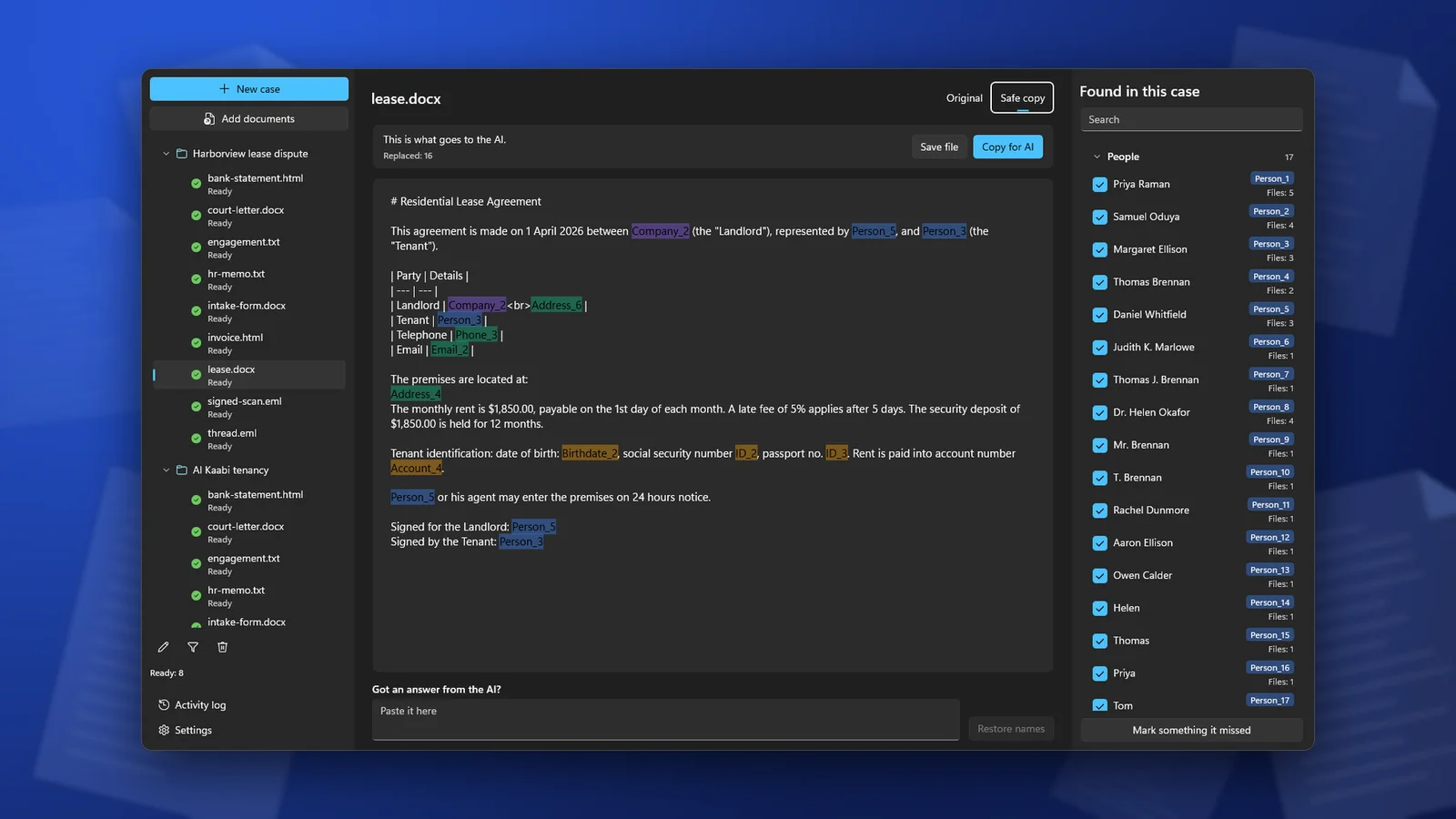
ClientSafe is one of these. It runs on a Windows PC and keeps documents in cases, so the same name gets the same placeholder in every document of a case. You review what it found, untick matches that are not personal data and mark what it missed. You copy the safe copy into an AI chat or save it as a Markdown file. Then you paste the AI's answer back and ClientSafe puts the real names in. The table linking placeholders to names stays encrypted on the PC until you delete the case. It is not a redaction tool for court filings or for documents you send to another party.
Side by side
| Criterion | Developer library (Presidio) | Cloud service (Google, Amazon) | PDF redaction (Acrobat Pro) | Desktop app (ClientSafe) |
|---|---|---|---|---|
| Where it runs | Your own machines | The provider's cloud, under your account | In the PDF editor | Your PC |
| Same placeholder for the same person | If you set it up | Google: with deterministic encryption. Amazon redaction: type labels only | No, black boxes | Yes, within a case |
| Reversible | With encryption or your own mapping | Google: with the key. Amazon redaction: no | No, by design | Yes, paste the answer back |
| Where the key lives | Wherever your code puts it | Google recommends Cloud KMS | No key | Encrypted on your PC until the case is deleted |
| Review and correction | You build it | You build it | You choose what to redact | Built in |
| Files | Text; images through the OCR module | Google: text and images. Amazon: plain text | PDF including scans, DOCX, XLSX, PPTX, HTML, TXT, EML and more | |
| Built for | Developers | Developers and IT teams | Anyone sharing PDFs | Office users on Windows |
| Pricing | Free, plus staff time | Per volume | Acrobat Pro plan | One-time $19.99 in the US, 7-day trial |
How to choose
- You process thousands of records in a database or a pipeline and have developers: a library or a cloud service.
- You send a document to someone outside the firm: redaction.
- You ask AI about client documents and need the names back in the answer: a desktop app with a review step and a way to restore names.
Before you commit, try the tool on three documents you know well, in each language you use, and count what it missed. If your firm has a data protection officer or compliance lead, involve them before the tool is used on client files.
Frequently asked questions
Once a document is pseudonymized, can I send it to any AI tool?
Not automatically. Under the GDPR it is still personal data, and the AI tool's own data settings and terms still matter. Pseudonymization lowers the risk. It does not remove it.
Can a free open-source library replace a paid tool?
Yes, if someone on your team can install it, write the code around it and maintain it. If nobody can, the library costs more in time than an app costs in money.
Do I need reversibility if I only want a summary?
If the summary will mention people, yes: you will want their names back in it. If it will not, a one-way replacement is enough.
How do I test a tool quickly?
Take a document where you know every name and number. Run it through the tool and compare. Check the scanned pages, the headers and the signatures, where detection most often misses.
ClientSafe replaces names, addresses, phone numbers and ID numbers with consistent placeholders on your PC, lets you review the list, and puts the real names back into the AI's answer. Detection is not perfect, so review the list before you copy.