Know you're ready
before you join
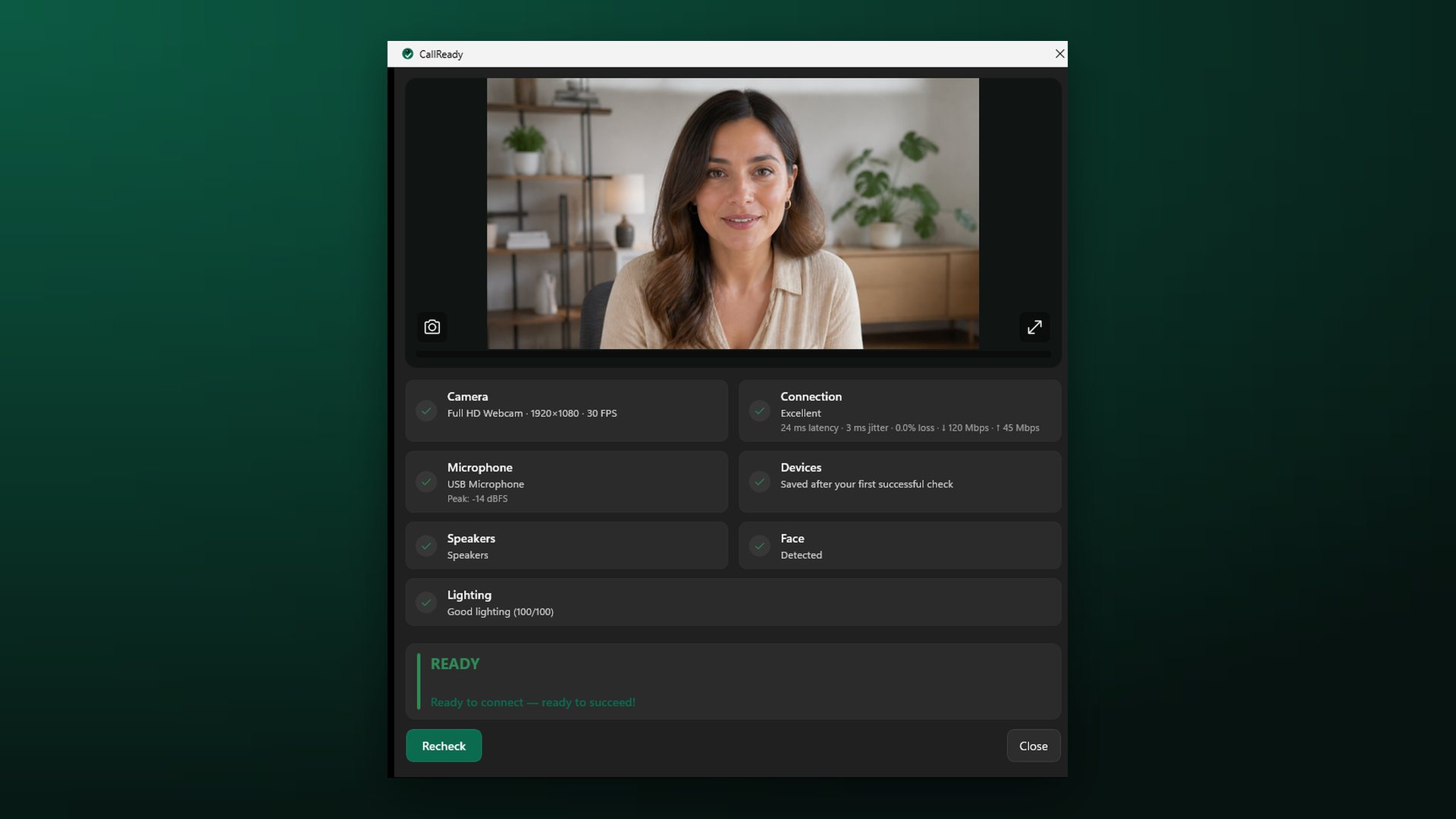
CallReady lives in the Windows system tray and checks your camera, microphone, speakers, lighting, devices, and connection in 10 seconds — before the important call starts.
is a terrible way to start a meeting.
The Problem
The first two minutes of an interview, a client call, or a review get spent on the same fumbling. Windows says the camera exists, the meeting app says the microphone is fine, and yet nobody can hear you.
- A webcam preview only answers "does it turn on?", not "am I ready?"
- Windows quietly switches to another microphone when a headset or dock connects
- A fast connection can still be unstable enough to break live video
- You cannot see your own lighting problem until someone mentions it
The Solution
CallReady turns the pre-call check into a ten-second ritual. One click from the tray, results appear as they finish, and every problem comes with the next concrete action.
- Camera, microphone, speakers, face, lighting, devices, and network in one pass
- Warns when Windows has switched to a device you did not choose
- Measures latency, jitter, and throughput, not just "is there internet"
- Plain-language verdict: READY, NEEDS ATTENTION, or NOT READY
A working camera is only one part of being ready. CallReady checks the setup as a whole and explains the next action in plain language.
Camera and framing
Opens a live preview, verifies the camera starts, and reports the active device, resolution, frame rate, and whether a face is visible.
Microphone and speakers
Confirms the microphone receives a signal, flags input that is too quiet or clipping, and checks that an audio output device is available.
Face-focused lighting
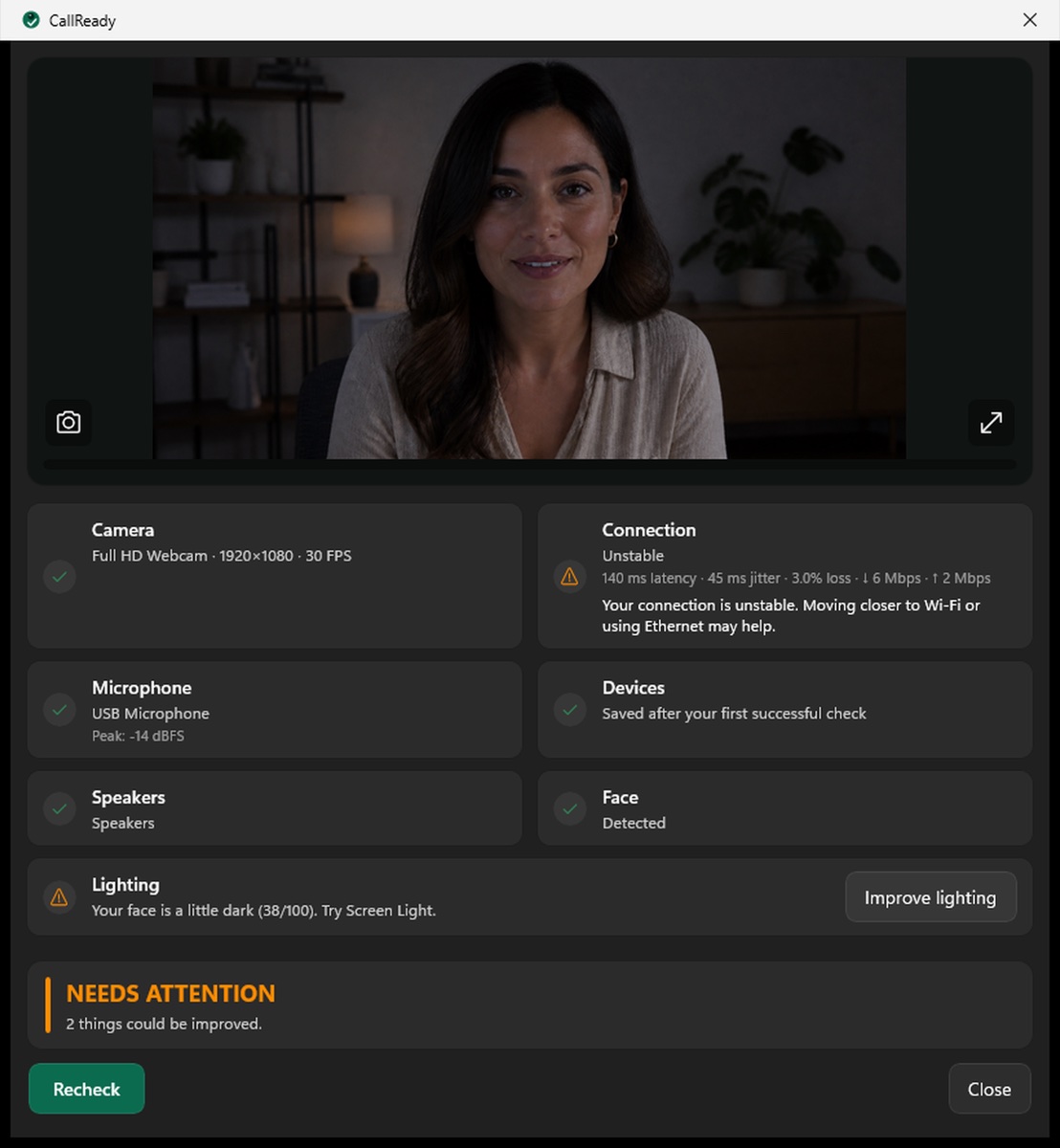
Evaluates the light on your face locally, not the brightness of the whole room. If your face is too dark, Screen Light turns the display you are using into a light.
Unexpected device changes
Remembers the devices from your last successful check and warns when Windows has switched to another camera, microphone, or speaker.
Connection stability
Checks connectivity, latency, jitter, and approximate upload and download throughput, so a fast-looking connection does not hide an unstable call.
See the check before you trust it
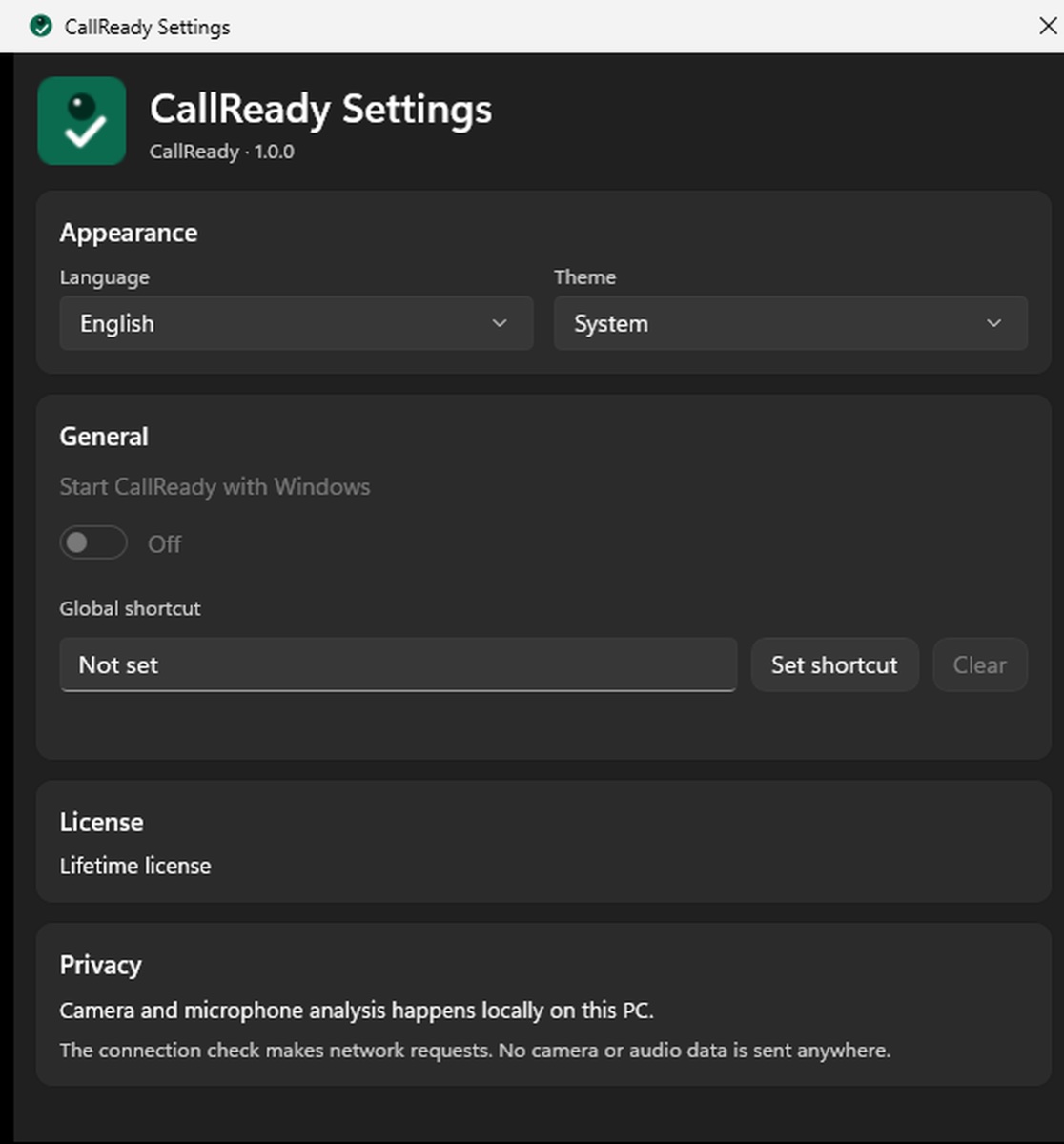
Real CallReady screens—from a clean READY verdict to actionable issues and device settings.
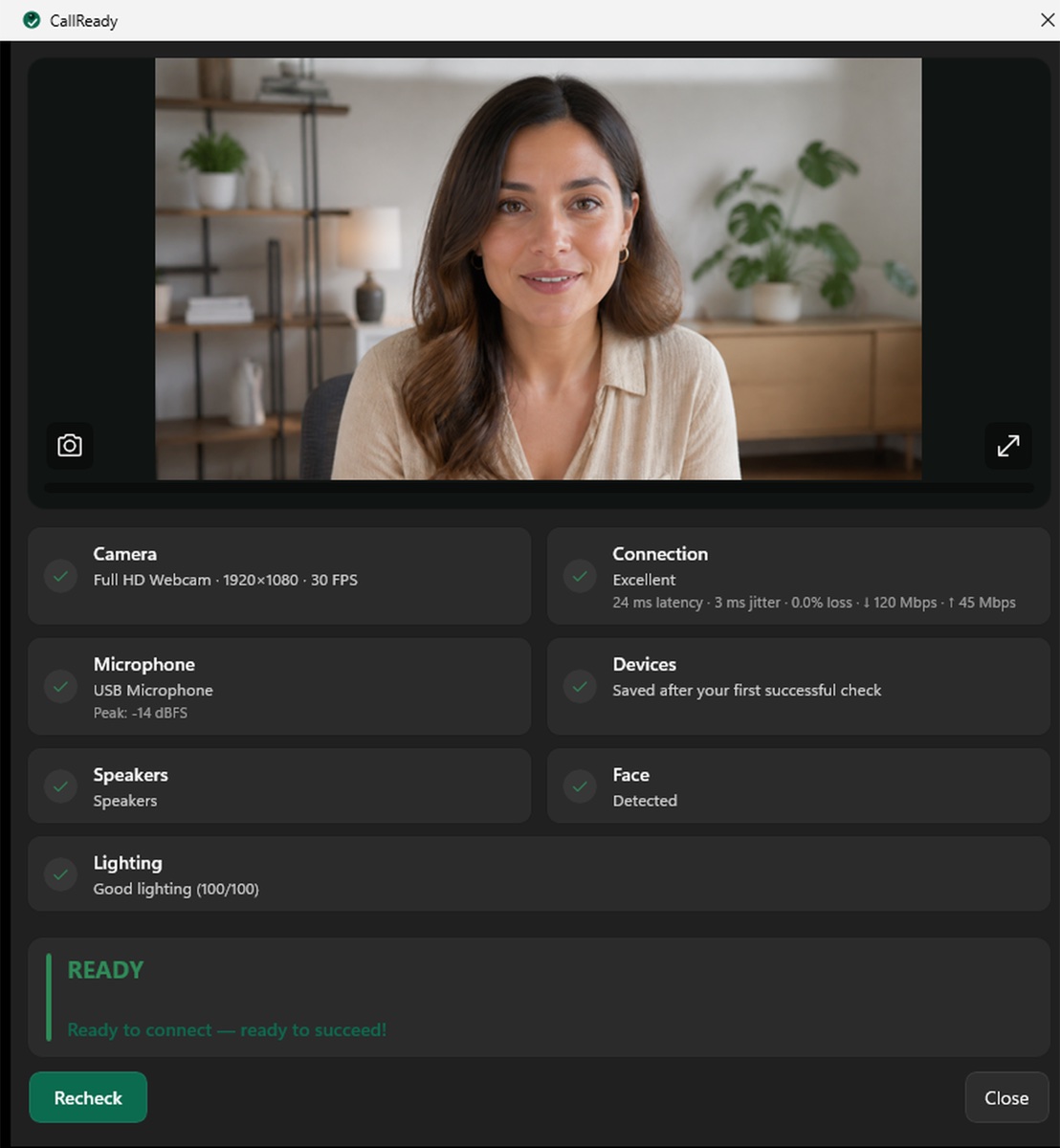
Your critical devices and connection are ready for the call. CallReady closes with a short encouraging message.
You can join, but lighting, speakers, or another non-critical detail deserves a look before you do.
A critical issue such as a camera, microphone, or connection failure needs fixing first. Critical failures always win.
One click from the tray
CallReady sits in the system tray. Click the icon, the camera preview appears immediately, and results resolve progressively as each check finishes.
Plain language, not error codes
"Your microphone is too quiet" beats a device ID and a decibel figure. Every issue is described the way you would describe it to a colleague.
A fix, or the next step
Where CallReady can safely open the right Windows setting, switch back to your preferred device, or brighten your face with Screen Light, it offers to. Where it cannot, it tells you exactly what to do.
Local analysis only
Camera frames, face detection, lighting analysis, and microphone levels are processed in memory on your PC. Nothing is recorded, stored, or uploaded.
Out of your way in seconds
The whole check is designed to finish in about ten seconds. Press Esc and the window closes, so the ritual never becomes the delay.
Speaks your language
The interface is available in ten languages: English, German, Spanish, French, Portuguese, Russian, Arabic, Japanese, Korean, and Chinese.
Microsoft Teams
Check devices before the join screen
Zoom
Camera, mic, and speakers verified up front
Google Meet
Browser calls with the right devices selected
Webex & others
Platform-independent Windows-level check
Interviews & webinars
Any call where the first minute matters
Also ready before calls in WhatsApp, Telegram, WeChat, Discord, Signal, and Slack.
CallReady checks the Windows devices and connection you plan to use. Each meeting app still controls its own device picker and permissions, so confirm those too.
Every platform has some kind of device preview. None of them tell you whether you are ready.
| CallReady | Meeting app test call | |
|---|---|---|
| Works before you open the app | Yes | No |
| Same check for every platform | Yes | One per platform |
| Face presence and lighting | Checked locally | You judge it yourself |
| Warns about changed devices | Yes | Rarely |
| Latency and jitter, not just speed | Yes | Varies |
| Time to a clear answer | About 10 seconds | A test call or a live meeting |
- No video is stored — camera frames are analysed in memory and discarded
- No audio is recorded — only the microphone level is measured
- No account, no sign-in, and no CallReady backend to send data to
- No analytics SDK inside the application
- Face presence and lighting analysis run entirely on your device
- The connection test sends measurement traffic to Cloudflare only — never camera, audio, or file content
A job interview starts once. Ten seconds beforehand is cheaper than discovering the laptop microphone was selected instead of your headset.
Back-to-back calls on a docked laptop, where every reconnect can move audio to the monitor speakers. CallReady notices before the client does.
Standups, reviews, and one-on-ones all day. A quick check after switching rooms, headsets, or networks keeps the first minute usable.
When dozens of people are waiting, "let me check my setup" is not an option. Confirm lighting, audio, and network stability in advance.
- All future updates included
- Every check, no feature gate
- No account and no recurring payment
Introductory lifetime price. Regional pricing is set by the Microsoft Store.
What does CallReady test before a video call?
Does CallReady record video or audio?
Does it work before calls in Teams, Zoom, Google Meet, Webex, WhatsApp, Telegram, WeChat, Discord, Signal, and Slack?
How long does a check take?
Which Windows versions are supported?
Is CallReady a subscription?
Does the connection test send anything private?
Where can I download CallReady?
Ready for your meeting in 10 seconds
Windows 10 and Windows 11 · 7-day full trial · lifetime purchase, no subscription.