PII masking for an AI prompt means replacing the details that identify a person (names, contact details, account and ID numbers, dates of birth) with neutral labels before you paste the text into ChatGPT, Claude or Gemini. Keep the roles, amounts and event dates the AI needs, mask everything that points to who the person is, and read the masked text once more before you send it.

What PII is, and how it differs from personal data
PII stands for personally identifiable information. It is a US term from federal guidance. OMB Circular A-130 defines it as information that can be used to distinguish or trace an individual's identity, either alone or combined with other information that is linked or linkable to that person. NIST SP 800-122, NIST's guide to protecting the confidentiality of PII, gives examples: name, Social Security number, date and place of birth, biometric records, and information linked to a person such as medical, financial or employment details.
The EU and UK use a different term. Under Article 4(1) of the GDPR, and the same article of the UK GDPR, personal data is "any information relating to an identified or identifiable natural person", including identification by location data, an online identifier, or factors specific to a person's physical, economic, cultural or social identity.
For a prompt, the difference is mostly one of habit. People who think "PII" tend to look for fields: name, SSN, email. The GDPR definition makes you also ask whether a sentence, read together with the rest, points to one person. If your clients are in the EU or UK, work to that wider definition. Whether a given use of AI is lawful for your firm is a question for your lawyer or data protection officer, not for a masking tool.
Why harmless details add up
Identifiers fall into two groups. Direct identifiers point to one person on their own: a full name, a passport number, an email address. Quasi-identifiers do not, but they narrow the field: a postcode, a birth date, a job title, a rare diagnosis.
The best-known measurement of how fast they narrow it comes from Latanya Sweeney. Using 1990 US Census data, she estimated in "Simple Demographics Often Identify People Uniquely" that 87% of the US population was likely unique on just three fields: 5-digit ZIP code, gender and date of birth. A later re-analysis by Philippe Golle put the figure at about 63% for the 2000 Census. Either way, three ordinary facts were enough to single out most people.
In a prompt, quasi-identifiers usually hide in free text: "the only female partner at the Leeds office", "the client who sold the bakery on Main Street last spring". Our list of what to remove before sending a document to AI goes through these combinations type by type.
Masking, redaction, pseudonymization: what the AI can still do
The three words are often used loosely. For a prompt, what matters is what each one leaves the AI to work with. Take one sentence: "Anna Weber emailed Tom Hale on 3 May; Anna disputes Tom's invoice."
| Method | The sentence becomes | What the AI can still do | Can you restore the names? |
|---|---|---|---|
| Redaction (remove or black out) | "[█████] emailed [█████] on 3 May; [█████] disputes [█████]'s invoice." | Little: it cannot tell who wrote, who disputes and who is owed. | No |
| Masking with a type label | "[NAME] emailed [NAME] on 3 May; [NAME] disputes [NAME]'s invoice." | It knows these are people, but not which is which. | No |
| Pseudonymization (consistent placeholders) | "Person_1 emailed Person_2 on 3 May; Person_1 disputes Person_2's invoice." | Follow who did what and answer in the same terms. | Yes, with the table that links placeholders to names, kept on your side |
For most AI tasks, consistent placeholders give the best answers, because the AI can still follow the story. The GDPR calls this pseudonymisation (Article 4(5)) and still treats the result as personal data. Our article on anonymization, pseudonymization and redaction explains the three terms in detail.
What to mask in a prompt, and what to keep
Mask what identifies the person. Keep what the question is about.
| Mask | Keep |
|---|---|
| Names of people and companies, nicknames, initials | Roles: buyer, tenant, employee, our client, the other side |
| Email addresses, phone numbers, street addresses | Country or jurisdiction, if the answer depends on it |
| Account numbers, IBANs, card numbers, tax and ID numbers, case and policy numbers | Amounts, unless the amount itself would identify the client |
| Dates of birth | Dates of events: signing, notice, payment, deadline |
| Free-text details that single someone out: a rare job title, a small town, a named relative | The facts the question turns on, phrased generally |
Age is a common exception to "mask dates of birth": if the answer depends on whether someone is over 18 or near retirement, write the age or "over 65" instead of the date.
A short prompt, before and after:
Before:
Maria Lopez (born 12 March 1981, maria.lopez@example.com) rents
a flat from Greenfield Lettings Ltd. Her deposit of $2,400 was not
returned after she moved out on 30 June. What can she do?

After:
Person_1 (born Date_1, Email_1) rents a flat from Company_1.
Person_1's deposit of $2,400 was not returned after Person_1 moved
out on 30 June. What can Person_1 do? Keep the placeholders as written.
The amount and the move-out date stay, because the answer depends on them. If the date of birth adds nothing to the question, delete it instead of masking it.
Three ways to mask
By hand
For one short prompt, read the text and replace each identifier yourself. Write the list of placeholders on a note as you go (Person_1 = Maria Lopez), so the same person always gets the same label. Hand masking is slow, and it fails in long texts: a name that appears twelve times gets replaced eleven times.
With find and replace for patterns
Some identifiers follow a fixed pattern, and a search with regular expressions finds them all at once. Text editors such as Notepad++ and VS Code support this, and Word has a wildcard search with its own syntax. Two patterns to start from:
Email:  [A-Za-z0-9._%+-]+@[A-Za-z0-9.-]+\.[A-Za-z]{2,}
IBAN:   \b[A-Z]{2}[0-9]{2}(?: ?[A-Z0-9]){11,30}\b
The IBAN pattern follows the structure in the SWIFT IBAN Registry: a two-letter country code, two check digits, then up to thirty letters and digits. Patterns catch formats, not meaning. They miss a phone number written as "oh-seven-seven", and they will never find a name.
With a detection tool
Detection tools look for names, companies and places as well as patterns. On a long document they are much faster than working by hand, but none of them finds everything. The documentation of the open-source detection toolkit Presidio says so plainly: because it uses automated detection, "there is no guarantee that Presidio will find all sensitive information."
So detection needs a review step. Go through what the tool found and untick false matches, such as a street name that is also a surname. Then read the text for what it missed: nicknames, names in lower case, a person described rather than named. What to look for in a pseudonymization tool compares the kinds of tools available.
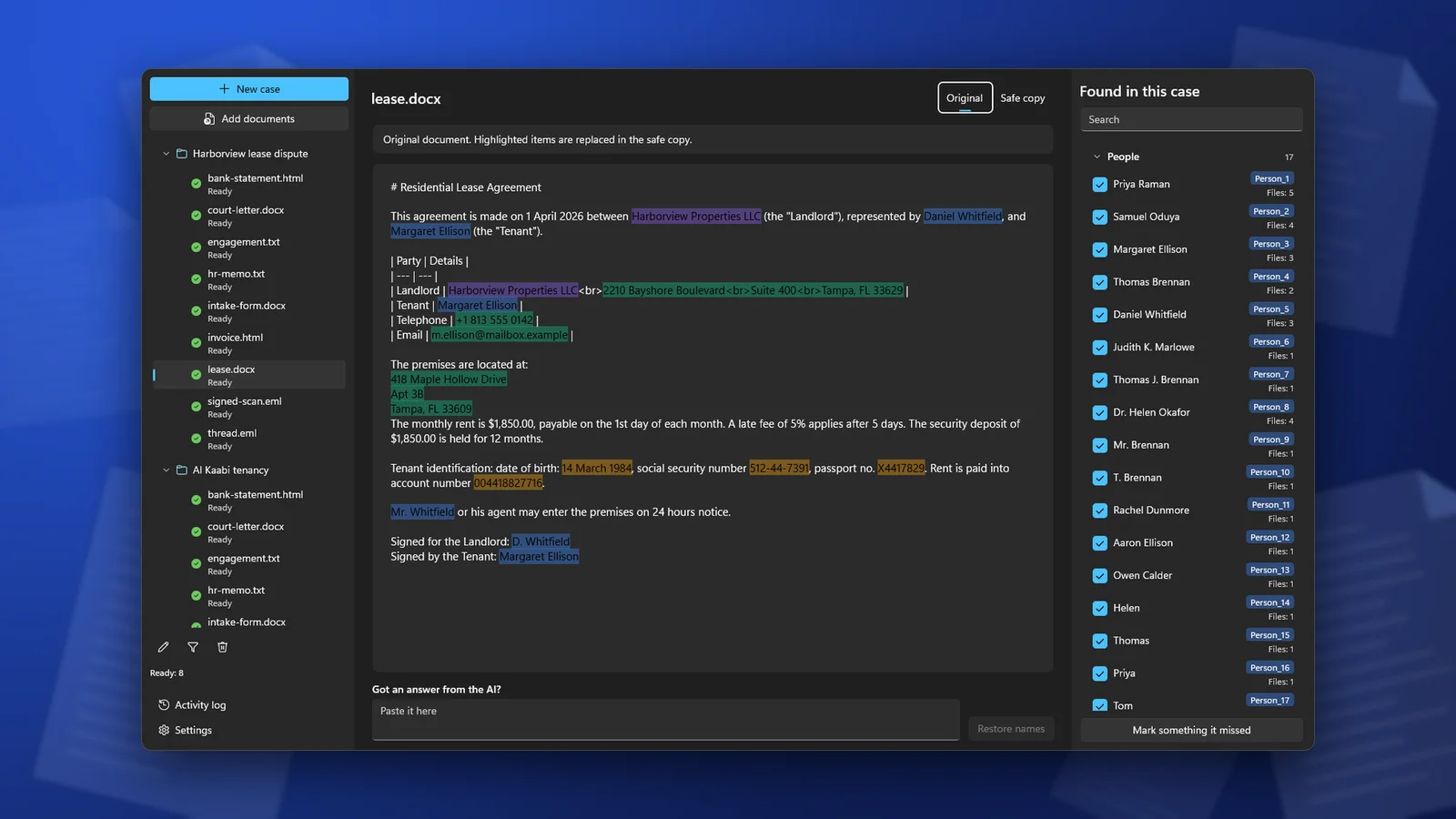
In ClientSafe, you add the documents to a case, and it finds names, companies, addresses, phone numbers, email addresses, account and ID numbers and dates of birth on your PC. You untick what is not personal data and mark what it missed. Then you copy the safe copy into the AI chat. The same person gets the same placeholder in every document of the case.
The answer comes back with placeholders
Masking works in both directions. The AI answers in the same terms you used, so its answer says "Person_1 can ask Company_1 for..." rather than "Maria Lopez can ask...". Asking it to keep the placeholders as written, as in the example above, makes this more likely.
Put the real names back on your own computer, not in the chat: a find and replace with your list of placeholders, or the same tool you masked with. Then read the restored answer once: a placeholder the AI changed ("Person 1" instead of "Person_1") may not have been restored. Our guide to restoring real names in the AI's answer covers the round trip step by step.
Frequently asked questions
Is masked text anonymous?
Usually not. If you keep a table that links placeholders to names, the text is pseudonymized, and under the GDPR it is still personal data. Masking reduces what the AI service receives. It does not take the text out of data protection law.
Should I mask company names?
Mask the client's company and any company that would identify the client, such as a small family business. A large public company named as a supplier or counterparty can often stay, if the question needs it.
Does masking make the AI's answer worse?
With consistent placeholders, rarely: the AI still sees who did what. It gets worse when the answer depends on something you masked, such as the country or a person's age. Add that detail back in a general form.
Can I just tell the AI to ignore the personal data?
No. By the time the AI reads the instruction, the data has already been sent. Masking has to happen before you paste.
ClientSafe replaces names, addresses, phone numbers, email addresses, account and ID numbers and dates of birth with placeholders on your PC, and puts the real names back into the AI's answer. Detection is not perfect, so review the list before you copy.