Safe from training, often yes: you can switch it off, and business plans have it off by default. Safe from being stored or read, no. On ChatGPT, Claude and Gemini an uploaded file is kept on the vendor's servers with the chat, deletion takes up to 30 days, some chats can be read by staff or contractors, and a court can order data to be kept. So upload a document only after you have removed what identifies a person in it.

Two questions: training and storage
"Is it safe" usually means one of two things.
The first is whether your document will be used to train the next model. This is a setting. You can turn it off on personal plans, and it is off by default on business plans of all three tools.
The second is whether the document is stored, for how long, and who can read it. No setting answers this one fully. The file reaches the vendor's servers the moment you upload it. It stays there while the chat exists, and for some time after you delete it.
For a bank statement, a tax return or a client's file, the second question matters more.
What happens to a file on a personal plan
This is what the vendors' own help pages say as of October 2026. Personal plans are ChatGPT Free, Go, Plus and Pro; Claude Free, Pro and Max; Gemini with a personal Google account.
| ChatGPT | Claude | Gemini | |
|---|---|---|---|
| Used for training | Yes, unless you turn off "Improve the model for everyone" | Only if you allow it, or if the chat is flagged for safety review | Yes, while Keep Activity is on |
| Kept while the chat exists | Until you delete it | Until you delete it | 18 months by default, or the auto-delete period you chose |
| After you delete it | Removed within 30 days | Removed within 30 days | Chats already seen by reviewers are kept for up to 3 years |
| Who can read it | Authorized staff and service providers, for listed reasons | By default no employee, with exceptions for feedback and safety review | Human reviewers read a subset of chats |
ChatGPT. OpenAI says that, depending on your settings, it may use "prompts, the model's responses, and other content such as images and files" to improve its models. According to its page on how it handles data in consumer services, authorized personnel and service providers may access content to investigate abuse or a security incident, to give support, to handle legal matters, or to improve models unless you opted out. The same page asks users not to enter sensitive information they would not want reviewed or used. Under its chat and file retention rules, a deleted chat is scheduled for permanent deletion within 30 days, unless OpenAI must keep it for security or legal reasons. A file saved to the Library is not deleted with the chat: you delete it separately.
Claude. Anthropic uses consumer chats for training only if you allow it, if a chat is flagged for safety review, or if you send feedback. If you allow it, chats may be kept in de-identified form for up to five years. A deleted chat leaves Anthropic's back-end storage within 30 days and is not used to train future models. Chats flagged as violating the usage policy are kept for up to two years. Feedback sent with the thumbs buttons is kept for five years, together with the whole conversation. These periods are on the How long do you store my data page. Anthropic also says that by default its employees cannot access your conversations, except when you share them as feedback or when the Trust and Safety team reviews them under the usage policy.
Gemini. According to Google's Gemini Apps Privacy Hub, when Keep Activity is on, your chats and uploads are saved and used to improve Google's services, including training generative AI models. A subset of chats is read by human reviewers, including Google's service providers. Reviewed chats are disconnected from your account and kept for up to three years, and deleting your activity does not delete them. With Keep Activity off, or in a temporary chat, chats are kept for 72 hours. Google's advice is direct: if Keep Activity is on, don't enter data that's confidential or that you wouldn't want a reviewer to see.
The switches that change these defaults are covered step by step in AI tools' data settings explained.
What changes on a business plan
Business plans change the training default. All three vendors say that business content is not used for training by default: ChatGPT Business, Enterprise and Edu, Claude for Work and the Anthropic API, and Gemini in Google Workspace, where content is also not reviewed by humans outside your organization without permission.
Business plans do not make the file disappear. Chats on Claude for Work stay until a user deletes them, then leave the back end within 30 days. In ChatGPT Enterprise and Gemini for Workspace, an administrator sets how long chats are kept; Google's admin options run from 3 months to indefinitely.
They also add a reader: your employer. OpenAI's service terms say ChatGPT Enterprise administrators may be able to access content. On Claude Team and Enterprise, the Primary Owner can export the organization's data, including conversations and uploaded files. For a firm this is usually what it wants. For a personal tax return uploaded to a work account, it may not be.
Deleted chats and court orders
Every vendor page quoted above has the same exception: data may be kept longer when the law requires it. In 2025 that exception applied to ChatGPT.
In May 2025, a US federal court in The New York Times' copyright case against OpenAI ordered it to preserve ChatGPT output logs that would otherwise be deleted, including chats users had deleted. OpenAI said the order covered Free, Plus, Pro and Team users and the API, and not ChatGPT Enterprise or Edu. The obligation ended on 26 September 2025. In its update of 22 October 2025, OpenAI said it had returned to deleting chats within 30 days, but would keep storing limited user data from April to September 2025 under legal hold.
The same can happen with any vendor. A file you upload is held by a company that can receive court orders where it operates, and a 30-day deletion promise applies only while no such order is in force.
What to remove first, by document type
For most questions, the AI needs the structure and the numbers, not the identity of the person. This table lists what to take out of the most common uploads.
| Document | Remove or replace | Usually fine to keep |
|---|---|---|
| Bank statement | Account holder's name and address, account number or IBAN, card numbers, names of people in payment references | Dates, amounts, merchant categories, large well-known merchants |
| Tax return | Name, address, tax ID (Social Security number in the US, National Insurance number in the UK, tax identification number in the EU), names and IDs of spouse and dependants, employer's ID, bank details for refunds | Income lines, deductions, the year |
| ID card, passport, driving licence | Do not upload it. If you need help with a form, type the field names instead | Nothing |
| Payslip | Name, employee number, tax and insurance numbers, bank account, home address | Gross pay, deductions, tax code, pay period |
| Client file | Client and counterparty names, companies, addresses, phone numbers, emails, case and account numbers, dates of birth | The facts and the terms, with placeholders in place of the parties |
| Resume | Phone number, email, home address, date of birth, photo, links to personal profiles | Jobs, skills, dates of employment, education |
Two places are easy to miss. The file name: "Garcia_tax_2025.pdf" says whose return it is before anyone opens it. And scanned pages: a name inside a scan does not show up in a text search. See personal data in scans and screenshots, and the full list of what to remove before a document goes to AI.
A resume is a special case. A resume often ends up with a recruiter anyway, so many people upload it as it is. Still, an AI only needs the contact details if you ask it to format the header. Remove them and add them back at the end.
A routine that works on any plan
- Send only what the question needs. If you are asking about one clause or one month, copy that page, not the whole file.
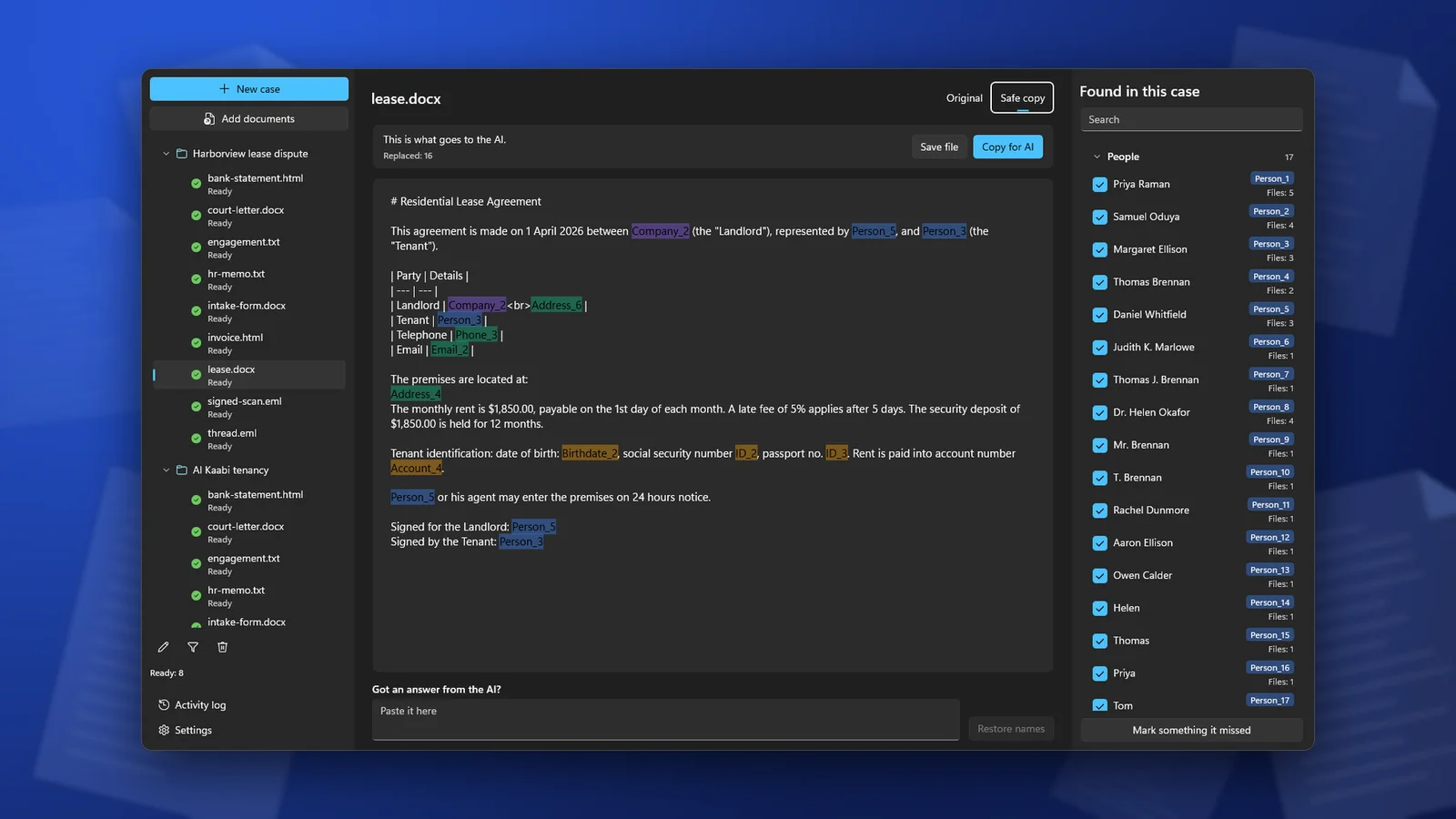
- Make a safe copy. Work on a copy, never the original. Replace each name, number and address with a placeholder such as Person_1 or Account_1, and use the same placeholder each time the same person appears. In Word, Find and Replace does this one term at a time.
- Paste the text instead of uploading the original file. The file name and anything you did not look at stay on your PC.
- Use a temporary or incognito chat, and do not press thumbs up or down: feedback can send the whole conversation to the vendor and keep it for years.
- Delete the chat when you have the answer, and any copy saved in the tool's file library.
If the document belongs to a client and you have professional duties of confidentiality, check with your compliance officer, data protection officer or bar rules whether a given AI tool may be used at all. A settings page is not the same as a contract or the client's consent.
ClientSafe does step 2 on your PC. It finds names, companies, addresses, phone numbers, email addresses, account numbers, ID numbers and dates of birth, replaces them with placeholders, and lets you review the list before you copy the safe copy into the chat.
Frequently asked questions
Is it safe to upload bank statements to ChatGPT or Claude?
Not as they are. Remove the account holder's name, address and account number first. The AI can categorize spending and spot unusual payments from dates and amounts alone. For client books, see AI for accountants.
Is Claude safer than ChatGPT for documents?
The defaults differ: Claude uses consumer chats for training only if you allow it, and Anthropic says its employees cannot access conversations by default. Both keep the file until you delete the chat, and both remove a deleted chat within 30 days. On either one, the file has left your computer.
Does a paid personal plan protect my files?
No. ChatGPT Plus and Pro, and Claude Pro and Max, follow the same consumer rules as the free plans. The business defaults apply to business plans.
If I turn off training, can I upload a client's document?
Turning off training removes one use of the file. It is still stored, can still be read in the cases the vendor lists, and can still be held under a court order. Replace the client's details first.
ClientSafe makes a safe copy of a document on your PC, with placeholders in place of names, account numbers and ID numbers, and puts the real names back into the AI's answer. Detection is not perfect, so review the list before you copy.
Information as of October 2026, taken from the vendors' help and privacy pages. Vendors change their terms; check the linked page before you rely on it. Not legal advice.